
WeLearn turns your learning into a light game: you earn XP, climb levels, keep a streak, collect badges, rank on a weekly leaderboard and take on quests. All of it is on when you join, and all of it can be switched off in Settings › Gamification (section 11). It unlocks nothing real: your trainings, results and certifications are the same whether you play or not.
| What | Where you see it |
|---|---|
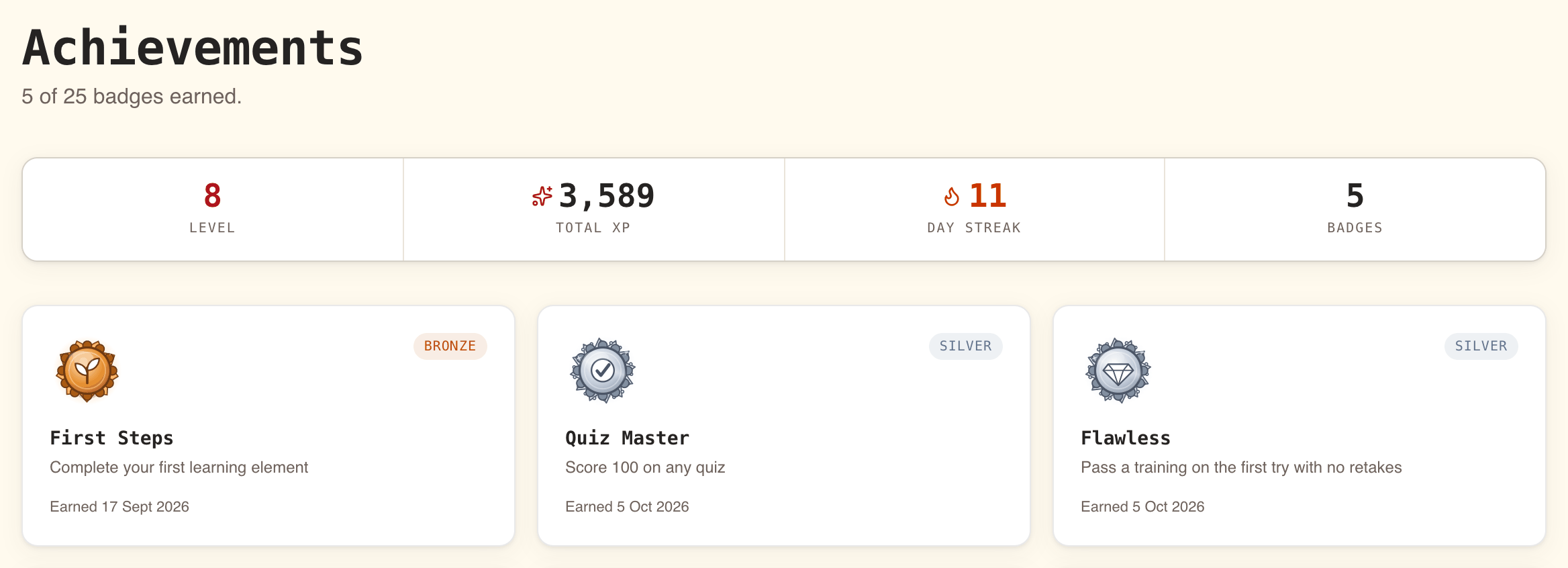
| Your level, XP, streak and freeze tokens | The strip at the top of your Dashboard. The top of Achievements shows Level, Total XP, Day Streak and Badges, but not freeze tokens |
| Badges, quest trophies, mastery tracks, the activity feed | Achievements in the sidebar |
| The badges you show to others | The Showroom on your profile |
| This week's ranking | Leaderboard in the sidebar |
| Running challenges | Quests in the sidebar |
| The daily puzzle | The Five Clues banner on your Dashboard. See Five Clues daily puzzle |
XP rewards finishing things, and good scores on evaluations
You earn XP when you complete something. Opening a page, starting a training or going fast earns nothing.
| You complete | XP |
|---|---|
| A Text section | 10 |
| A Link section | 5 |
| An evaluation: Quiz, Ordering, Matching, Categorization, Numeric, Cloze or Peer review | 10, plus 0.4 × your score, rounded: from 10 at 0% to 50 at 100% |
| A whole training | 50 more, whatever your score |
| A training you were enrolled in as mandatory, finished before its due date | 25 more |
| A quest | The bonus the quest announces (section 10) |
| The Five Clues daily puzzle | 10 to 75, depending on how many clues you needed. See Five Clues daily puzzle |
Some evaluation examples: 100% earns 50 XP, 90% earns 46, 75% earns 40, 50% earns 30, and 0% still earns 10 for having tried.
A Peer review earns its XP when a reviewer decides, not when you submit. A pass counts as 100% and Needs more work as 0%; a pass after a revision is paid like a retake, below.
The 25-point bonus applies when your enrolment is a mandatory one, because the training is marked mandatory or because a Manager ticked Mandatory training when enrolling you, and you finish before the due date it carries. Without a due date there is no bonus.
XP is never taken away. Your total only grows.
Your level rises on a curve that gets steeper
Your level comes from your total XP. Each step costs 100 XP more than the one before: going from level n to level n+1 takes 100 × n XP.
| Level | Total XP needed |
|---|---|
| 1 | 0 |
| 2 | 100 |
| 3 | 300 |
| 4 | 600 |
| 5 | 1,000 |
| 6 | 1,500 |
| 10 | 4,500 |
| 25 | 30,000 |
The Dashboard strip shows Lv with your level, your total XP and, on wider screens, how much XP you still need, such as "250 XP to level 5". Each new level sends you the notification "You reached level N", and the people who follow you can see it in their feed (section 8). A large quest bonus that crosses several levels at once counts each of them.
A streak counts the days you are active, and weekends never break it
Your streak is the number of days in a row on which you completed something. It is counted in working days: a weekend or a public holiday in between never breaks it.
- What counts as activity: completing any section of a training, finishing a training, or finishing the Five Clues puzzle, whether you solved it or used all five clues. One completion is enough for the day; more do not add to it.
- What does not count: opening WeLearn, starting a training, or submitting a peer-review exercise. A peer review completes, and counts, on the day the reviewer decides.
- Which day it is: days are counted in your own time zone, the one chosen in Settings › Language under Show dates in, or your organisation's when you chose none. Something completed at 00:30 your time counts for that new day.
- Which holidays: the French public holidays. New Year's Day, Easter Monday, 1 May, 8 May, Ascension Day, Whit Monday, 14 July, 15 August, 1 November, 11 November and Christmas Day.
- A day off you are active on still counts. Completing something on a Saturday or a holiday adds a day to your streak; it simply is not required.
When you miss a working day, a freeze token covers it if you have one (section 4). If you have none, your next completion starts a new streak at 1. Your longest streak is kept, and the streak badges follow your longest streak, so a broken streak never takes a badge back.
On a working day when you have not completed anything yet and were active the working day before, WeLearn reminds you at 18:00 in your own time zone, once your streak is at least 3 days long: "Your N-day streak is about to break, complete something today". Your streak counts days in your time zone too, so "today" is your today. The reminder has its own row, Streak reminders, in Settings › Notifications; see Notifications.
Freeze tokens cover missed working days
A freeze token protects your streak for one missed working day. You do not spend it yourself: WeLearn uses it the next time you complete something.
- At the start of every month, you receive 2 freeze tokens, up to a maximum of 5. You receive them once you have been active at least once.
- Each missed working day uses one token. Missing two working days uses two.
- If you missed more working days than you have tokens, the streak restarts at 1 and your tokens are not used: you keep them for next time.
The snowflake on the Dashboard strip shows how many tokens you hold, once you have any.
Badges come in four tiers, and some stay secret
Badges reward milestones. Each has a tier, Bronze, Silver, Gold or Platinum, and every badge you have not earned yet is shown on Achievements as Locked, with what it takes. Once earned, it shows Earned and the date, and you receive the notification "You earned the "…" badge". A badge is earned once and kept for good.
| Family | Badge | Tier | How to earn it |
|---|---|---|---|
| Learning | First Steps | Bronze | Complete your first section |
| Quiz Master | Silver | Score 100 on an evaluation of any kind, a peer review pass included | |
| Flawless | Silver | Pass a training on the first try, without retaking it. The training must contain at least one evaluation | |
| Comeback Kid | Bronze | Pass a training after retaking it | |
| Perfectionist | Gold | Have 10 evaluations standing at 100 at the same time | |
| Deadline Crusher | Gold | Finish 5 mandatory enrolments before their due date | |
| Topics | Topic Explorer | Silver | Finish trainings covering 3 different topics |
| Topic Master | Gold | Finish every published training in one topic | |
| Streak | On a Roll | Bronze | Reach a 5-day streak |
| Unbroken | Silver | Reach a 20-day streak | |
| Relentless | Gold | Reach a 50-day streak | |
| Centurion | Platinum | Reach a 100-day streak | |
| Level | Apprentice | Bronze | Reach level 5 |
| Journeyman | Silver | Reach level 10 | |
| Veteran | Gold | Reach level 25 | |
| Time of day | Night Owl | Bronze | Complete something between midnight and 5:00, Paris time |
| Early Bird | Bronze | Complete something between 5:00 and 7:00, Paris time | |
| Authoring | Author | Bronze | Publish your first training |
| Knowledge Sharer | Silver | Have 3 published trainings | |
| Mentor | Gold | Author a training that 10 people have finished | |
| Beloved Mentor | Platinum | Author trainings finished 100 times in total | |
| Daily puzzle | Clairvoyant | Bronze | Guess a Five Clues answer before seeing any clue |
| Daily Regular | Silver | Finish the Five Clues puzzle on 10 days |
A few details the short descriptions on the cards leave out:
- Perfectionist counts the scores standing now. Retaking an evaluation clears its score until you finish it again, so your count can go down before it reaches 10.
- Mentor and Beloved Mentor count everyone who finished, you included, and are checked each time someone finishes one of your trainings. Co-authors each earn them.
- A training finished below its passing score still counts as finished for Topic Explorer and Topic Master, but not for Flawless or Comeback Kid, which need a pass.
- Topic Master, Mentor and the mastery tracks count trainings, not versions. A training you finished stays finished when its authors publish a new version of it, and Mentor adds up the people who finished any version.
Badges for quests are separate: see Quest trophies in section 10.
Mastery tracks show how much of each topic you have finished
Mastery tracks, on Achievements, list every topic that has at least one published training, with how many of them you have finished, such as "3 / 4 · 75%". The topic you are furthest along comes first.
| Share finished | Tier shown |
|---|---|
| Under 25% | None |
| 25% | Bronze |
| 50% | Silver |
| 75% | Gold |
| 100% | Platinum |
A track is not a badge. It is worked out again each time you look, from the trainings published today, so a new training in a topic lowers your share until you finish it, and an archived one leaves the count. Reaching 100% in a topic earns the Topic Master badge, which you keep.
Your showroom is the badges others see on your profile
The Showroom section of your profile shows your badges and quest trophies to everyone in your organisation. Each one carries a rarity label, worked out from how many members of your organisation hold it, and a line such as "4 of 60 members have this".
| Rarity | Held by |
|---|---|
| Legendary | 5% of members or fewer |
| Epic | Up to 15% |
| Rare | Up to 35% |
| Uncommon | Up to 60% |
| Common | More than 60% |
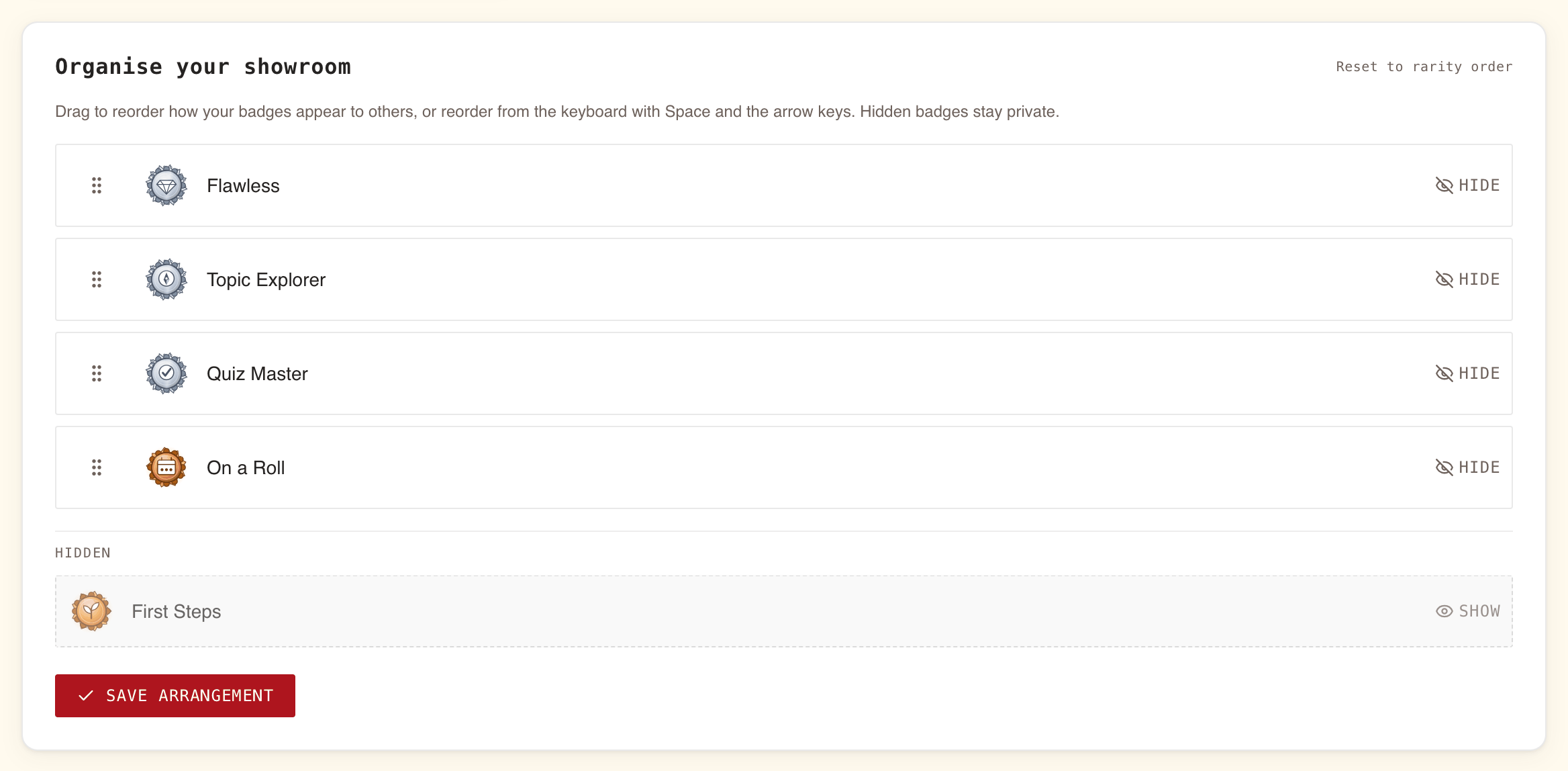
By default the rarest come first. To choose the order or hide some, open Organise your showroom on Achievements, or Organise beside Showroom on your profile:
- Drag a badge by its handle to move it, or select the handle and use Space and the arrow keys.
- Select Hide to take a badge off your profile. It moves to Hidden, where Show brings it back.
- Select Save arrangement. "Arrangement saved." confirms it.
A badge you earn later appears after the ones you arranged, in rarity order, without you saving again.
If you switch gamification off, other members see "… is not sharing achievements." instead of your showroom.
Following people fills your activity feed
Select Follow on someone's profile, or beside their name on the Team page. The button then reads Following; select it again to unfollow. They receive "… started following you".
Following someone does two things:
- Following activity, on Achievements, lists their recent badges, new levels and finished quests, the 30 most recent, with the date. It never shows scores or XP totals.
- You are notified when they publish a training. See Notifications.
Anyone can see how many followers you have and how many people you follow; the names on those lists are visible to you and to Administrators only.
The feed works both ways. You see it only while your own Share to activity feed is on, and a person appears in it only while theirs is on too.
The leaderboard ranks this week's XP inside your groups and topics
Leaderboard ranks the XP earned since Monday, not your total, so a newcomer can top it. It resets every Monday at midnight, Paris time. All XP counts, quests and the daily puzzle included.
There is no organisation-wide board. You get one tab per group you belong to, under Groups, and one per topic you follow, under Thematics, the word this page uses for topics. To follow a topic, open your profile and select it under Topics.
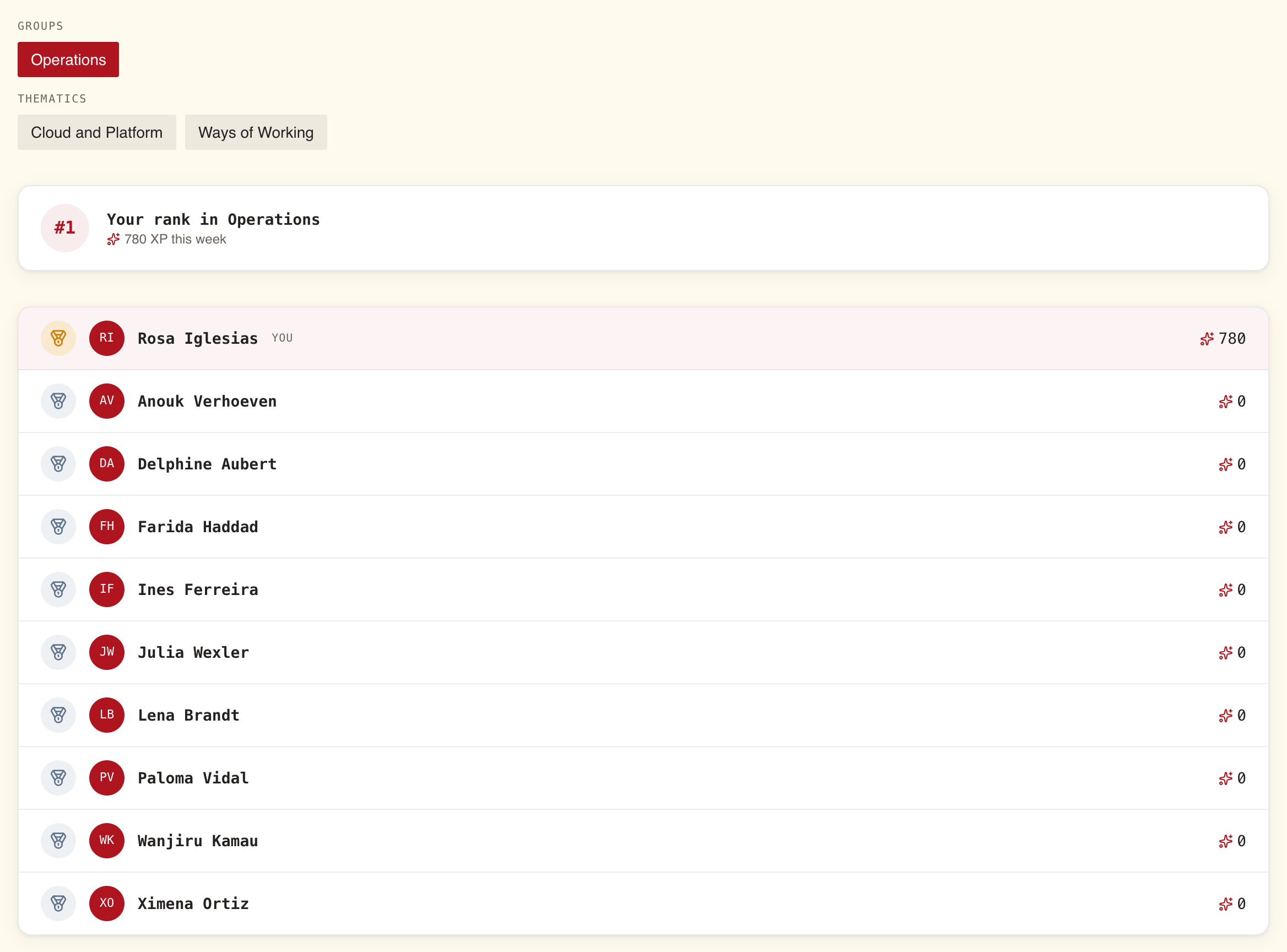
- A card at the top shows "Your rank in" and the board's name, with your XP this week.
- The board lists up to 100 people, most XP first. Equal XP shares a rank. The first three carry a medal instead of a number, and your own row is marked You.
- Everyone taking part is listed, at 0 XP if they have not earned anything this week.
- Members who switched Appear on leaderboards off are not on any board.
When you are in no group and follow no topic, the page reads "Join a group or follow a thematic to see a leaderboard."
Quests are time-boxed challenges your managers set
A Manager or Administrator can issue a quest: finish a number of trainings, sometimes in one topic, between two dates. Quests lists every quest open right now, the one ending soonest first. When nothing runs, it reads "No quests are running right now. Check back soon, or nudge your manager to start one."
Each quest card shows:
- its title, its description, and the season it belongs to, if any;
- how long is left, as "N days left", in red when 3 days or fewer remain, or Completed;
- which trainings count: "Any training counts", or the topic;
- your progress, such as "2 of 3 trainings", and its percentage;
- the reward: "+N XP", and the name of an exclusive badge if it carries one.
When a season is running, a banner above the quests shows its name, its end date and the days left.
Only trainings you finish between the quest's start and end count. A training you started before the quest but finish during it counts; one you finished before it began does not. A training finished below its passing score still counts.
The moment you reach the target, you receive the bonus XP, the notification "Quest complete: "…" (+N XP)", and the badge if there is one. Your followers see the quest in their feed. The quest stays on the board, marked Completed with "Finished" and the date, until it ends.
Quest badges appear under Quest trophies on Achievements: "Limited-time badges from completed quests. These never come back." Each shows the quest it came from and when you earned it. A quest you missed cannot be earned later, and a trophy stays yours even if the quest is cancelled.
Every switch is yours, and the visibility switches work both ways
Open Settings › Gamification, change the switches, then select Save preferences.
| Switch | Off means | Leaves the sidebar |
|---|---|---|
| Take part in gamification | No XP, streak, badge or quest progress is recorded for you. Your badges leave your profile and you leave every leaderboard and feed. Turning it off also turns the three switches below off and greys them out | Achievements, Leaderboard, Quests, plus the Dashboard strip and the Five Clues banner |
| Show level on dashboard | The XP strip leaves your Dashboard. Nothing else changes, for you or anyone | Nothing |
| Appear on leaderboards | You leave every leaderboard and the daily puzzle's Slack scoreboard, and you can no longer see leaderboards | Leaderboard |
| Share to activity feed | Your followers stop seeing your badges, levels and quests, and you stop seeing their feed | Nothing; the feed on Achievements asks you to turn the switch back on |
What you earned before switching off is kept and comes back when you turn it on again. XP you would have earned while it was off is not added afterwards. Turning Take part in gamification back on leaves the other three off: turn on the ones you want, then save.
What each switch means for your data is in Privacy and your data.