
A quest is a time-boxed challenge you set for your organisation: "finish 3 security trainings before the end of the month". Everyone who finishes it in time earns the bonus XP you chose, and an exclusive badge if you attach one. A season is a named period, such as "October Security Month", that groups several quests under one banner.
Quests and seasons are for Managers and Administrators. Learners see the result on their Quests page, described in Gamification.
Manage quests is behind the Quests page
Open Quests in the sidebar and select Manage at the top of the page. The Manage quests page has three parts, from top to bottom:
| Part | What you do there |
|---|---|
| Issue a quest | Create a quest |
| Seasons | See every season and open a new one |
| Issued quests | See every quest ever issued, how many people finished each, and cancel one |
Quest board at the top takes you back to what learners see.
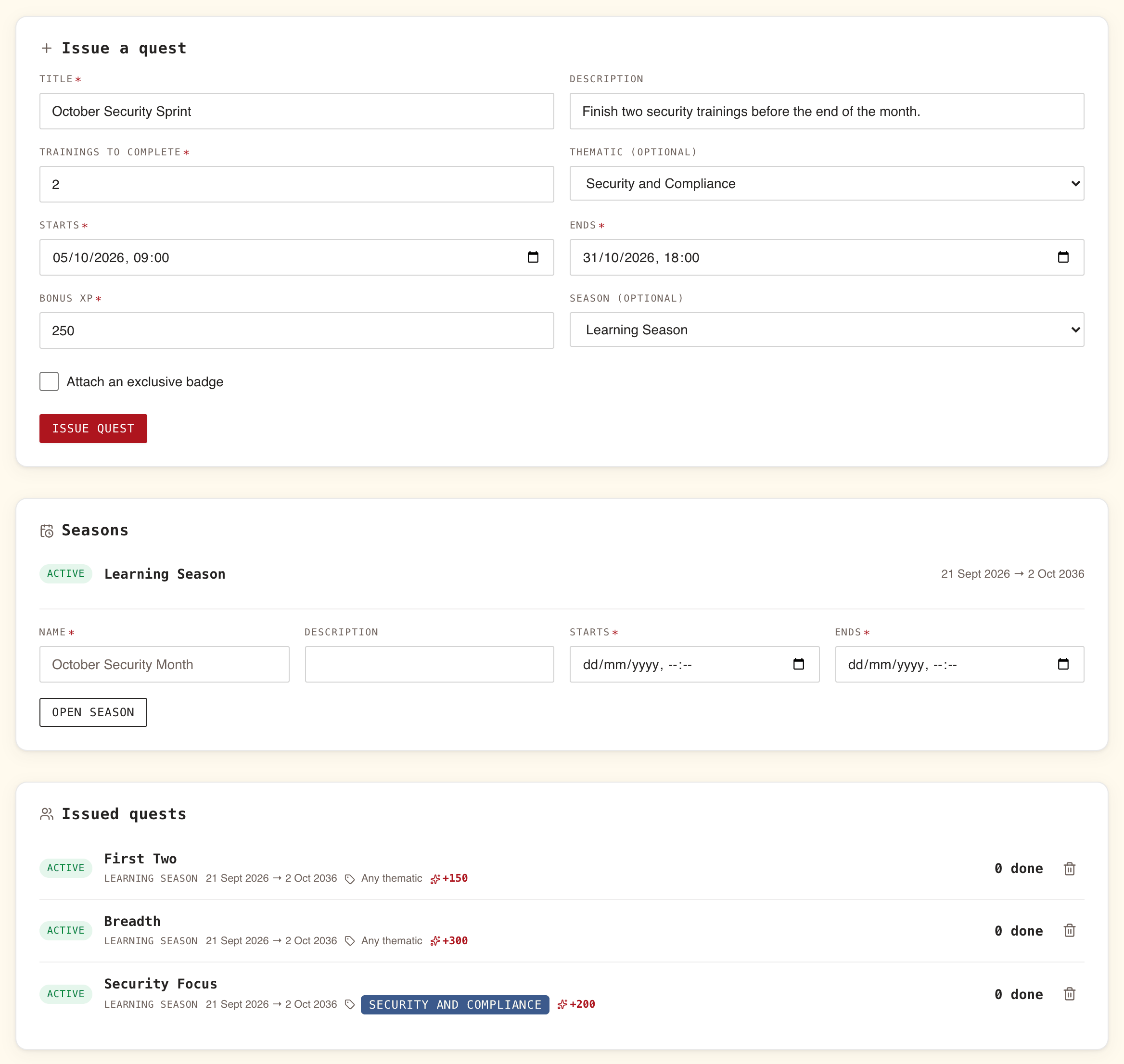
Issue a quest: every field and what it does
Fill in the form, then select Issue quest. The quest is created at once and appears on every learner's board as soon as its start time comes.
| Field | Required | What it means | Limits |
|---|---|---|---|
| Title | Yes | What learners read on the card | Up to 120 characters |
| Description | No | One line under the title, such as why the quest exists | Up to 500 characters |
| Trainings to complete | Yes | How many trainings a learner must finish inside the window | 1 or more. Starts at 3 |
| Thematic (optional) | No | Any thematic, or one topic: then only trainings tagged with that topic count. This form calls topics "thematics" | One topic at most |
| Starts | Yes | When the quest opens, date and time | In your own time zone, as your browser knows it |
| Ends | Yes | When the quest closes. A training finished at this moment or later does not count | Must be after Starts, or the form shows "The end date must be after the start date." |
| Bonus XP | Yes | The XP each learner earns on finishing the quest | 0 to 10,000. Starts at 100 |
| Season (optional) | No | No season, or a season the quest belongs to | Any season, closed ones included |
Tick Attach an exclusive badge to give the quest its own badge. Three more fields appear:
| Field | Required | Limits |
|---|---|---|
| Badge title | Yes | Up to 80 characters |
| Badge description | No | Up to 200 characters |
| Tier | Yes | Bronze, Silver, Gold or Platinum. Starts at Gold |
A quest cannot be edited once issued. To change anything, cancel it and issue a new one (section 6).
How a quest is completed
A learner completes a quest when the number of trainings they have finished between Starts and Ends reaches Trainings to complete.
- Finished inside the window is what counts. A training started before the quest and finished during it counts. One finished before Starts does not, and nor does one finished after Ends.
- Finished means finished, not passed: a training completed below its passing score still counts.
- Each training counts once. Retaking the same training does not count it twice.
- With a topic, only trainings tagged with that topic count, whatever else they are tagged with.
- WeLearn checks at the moment a learner finishes a training. On reaching the target they get the bonus XP, the notification "Quest complete: "…" (+N XP)", the badge if there is one, and an entry in their followers' activity feed. They are rewarded once, even if they keep going.
Learners who have turned off Take part in gamification do not see quests and cannot complete them.
Seasons group quests under one banner
A season is a name and a period. It awards nothing by itself: the quests you attach to it carry the rewards. What it adds is a banner at the top of every learner's Quests page while it runs, with its name, its description, "Ends" and the date, and the days left; and the season's name on each of its quest cards.
To open one, fill in the form at the bottom of Seasons, then select Open season:
| Field | Required | Limits |
|---|---|---|
| Name | Yes | Up to 80 characters. Placeholder: "October Security Month" |
| Description | No | Up to 300 characters |
| Starts | Yes | Date and time, in your own time zone |
| Ends | Yes | After Starts |
Then pick it in Season (optional) when you issue each quest.
The list above the form shows every season with its dates, marked Active while it runs and Closed otherwise. A season cannot be edited or deleted.
Issued quests shows who is finishing
Issued quests lists every quest your organisation has issued, the most recent first. Each row shows:
- Active while the quest is open, Inactive before it starts and after it ends;
- the title, the season if any, the dates, which trainings count (Any thematic, the topic, or Removed thematic), the bonus XP and the badge's name;
- on wider screens, the number of people who finished it, as "12 done".
The count includes people who have since left the organisation. Use it while the quest runs to see whether the push is landing, and afterwards to compare quests.
Cancelling a quest takes nothing back
Select the bin icon on a row, Cancel quest. The dialog reads "Cancel this quest?" and ""…" will disappear from the board. Rewards already earned stay earned." Confirm with Cancel quest.
| After cancelling | |
|---|---|
| The quest | Gone from every learner's board and from Issued quests, with its completion count. It cannot be brought back |
| People who already finished it | Keep the bonus XP, the badge under Quest trophies, and the entry in the activity feed |
| People part-way through | Get nothing for it |
What learners see
On Quests, each running quest is a card with its title, description, season, "N days left" (red from 3 days left), which trainings count ("Any training counts" or the topic), their progress such as "2 of 3 trainings" with a percentage, "+N XP", and the badge's name with its tier colour. Quests ending soonest come first. A quest a learner has finished stays on their board, marked Completed, until it ends.
A learner sees nothing of a quest before its Starts time, and it leaves their board at Ends. The badges they earn stay under Quest trophies on Achievements for good.
Ideas and traps
| Idea or trap | What happens | What to do |
|---|---|---|
| A security month | One season, a quest per week on the security topic, each with its own badge | Give the last quest a Platinum badge for those who stay the course |
| A catalogue push | "Finish 3 trainings this month" | Any topic and a modest bonus, such as 100 to 200 XP |
| A start date in the past | Trainings finished since that date count. Someone already at the target is rewarded only when they next finish a training | Start quests now or later, unless you mean to reward recent work |
| A target higher than the topic has trainings | Nobody can complete it | Check how many published trainings the topic has before setting the target |
| A huge bonus | 10,000 XP alone takes a new learner to level 14 and decides that week's leaderboard | Keep bonuses in the low hundreds; use the badge as the prize |
| Quest dates outside its season | The quest runs without the season's name showing | Match the dates, or leave the quest out of the season |
| A typo after issuing | A quest cannot be edited | Cancel it straight away, before anyone finishes it, and issue it again |
| A quest showing Removed thematic | Rare, since a topic cited by a quest cannot be deleted, but possible. Hovering it reads "The thematic this quest is scoped to no longer exists. No training can satisfy it, so cancel the quest and issue a new one." | Do exactly that |
| Expecting only one team to take part | Every member taking part in gamification sees the quest | Say who it is for in the title |