
Some trainings end in a Peer review: the learner writes a response, and a person, not WeLearn, decides whether it passes. If a training names you as one of its reviewers, that person is you. This page covers how work reaches you, what you see, how to record your verdict, and what follows for the learner.
What the learner sees on their side is in Answering each exercise type. How an author sets a peer review up is in Setting up peer review.
Who reviews: whoever the training names, its authors by default
Any member can be a reviewer, whatever their role. Each training decides who reviews its peer reviews, under Reviewers on the Publish step of the editor:
| The training's Reviewers | Who can review |
|---|---|
| Nobody named (the default) | The training's authors |
| People, groups, or both | Exactly those people and the current members of those groups. The authors no longer review unless they are named too |
Two rules hold in every case:
- You never review your own work. Even as an author of the training, or through a named group, your own submission never reaches your queue.
- Your role does not make you a reviewer. An Administrator who is not named, and not an author, cannot review the training's submissions.
How you learn there is something to review
Each time a learner submits, or sends a revised version, every reviewer of that training is told:
- A notification: "… submitted work for your review", with the learner's name. It opens the Reviews page. It belongs to Required notices in Settings › Notifications, so it always reaches your WeLearn inbox; on Slack, its button reads Review the submission. See Notifications.
- A band on your Dashboard: Awaiting your review, listing the oldest submissions first, up to five, with See all and the number when there are more. See Your dashboard.
If the learner leaves the organisation before anyone reviews their work, the submission is withdrawn: it leaves your queue and you receive "A submission you were asked to review was withdrawn: the learner has left".
The Reviews page
The Reviews page has no entry in the sidebar. You reach it from the dashboard band, from the notification, or from a bookmark.
It is headed Reviews, "Submissions waiting on your verdict, oldest first." The learner who has waited longest is at the top. When nothing is waiting, it reads Nothing to review, "Submissions you are allowed to grade will appear here."
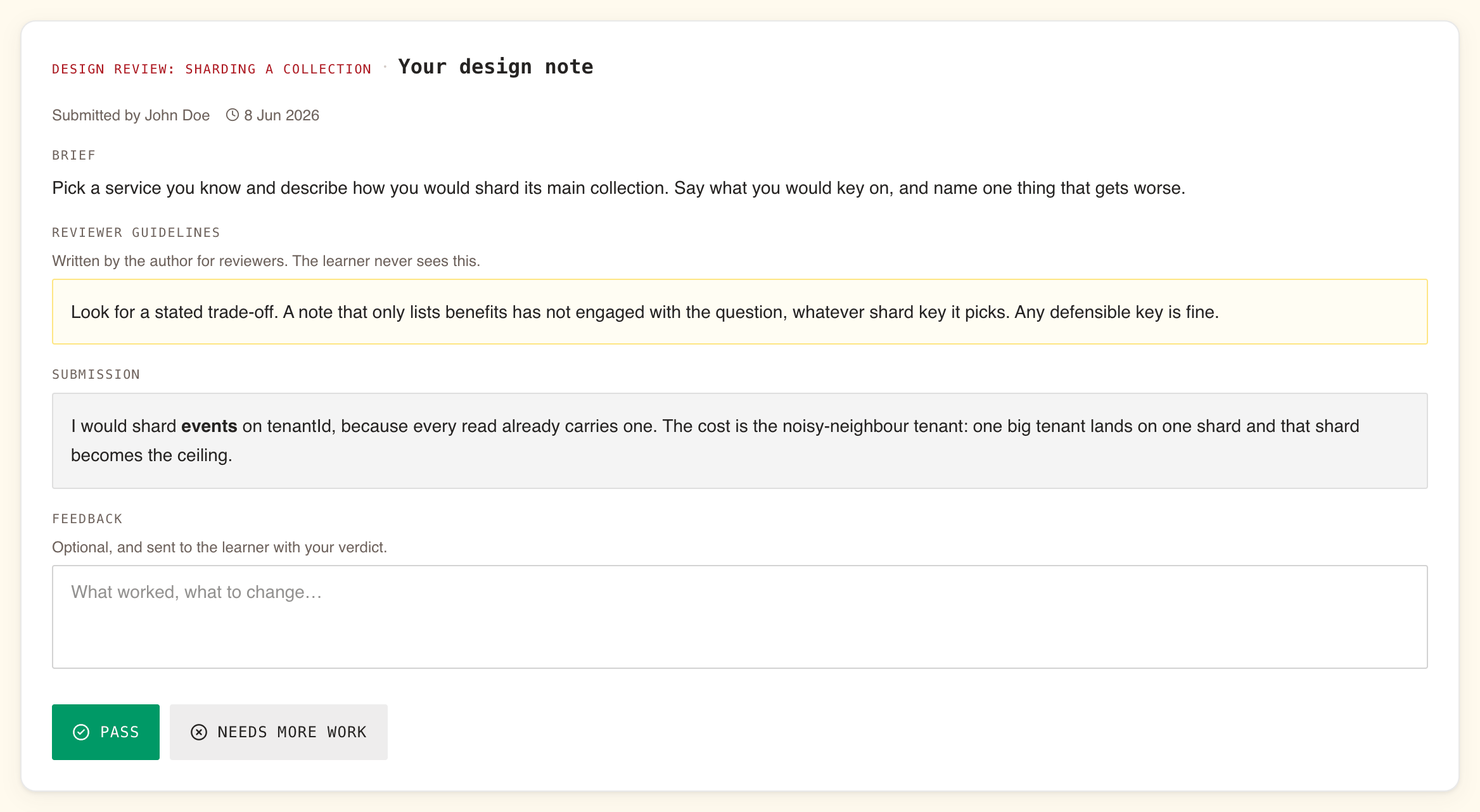
Each submission is a card, from top to bottom:
| Part | What it holds |
|---|---|
| Title line | The training's title, then the exercise's title |
| Submitted by | The learner's name, and the date they sent it |
| Brief | What the author asked the learner to write, exactly as the learner saw it |
| Reviewer guidelines | The author's notes on what to weigh. "Written by the author for reviewers. The learner never sees this." Shown only when the author wrote some |
| Submission | The learner's response |
| Feedback | A box for your comments. "Optional, and sent to the learner with your verdict." |
| Pass and Needs more work | Your verdict |
When the learner has sent a revised version, the card shows the new text only. Your earlier feedback is not repeated on it.
Giving your verdict
- Read the Brief and, if present, the Reviewer guidelines.
- Read the Submission.
- Write your Feedback. It is optional, but it is what lets the learner act: say what worked and what to change.
- Select Pass or Needs more work.
The verdict is recorded at once, with no confirmation, and the card leaves the page.
When several people review the same training, the first verdict counts. The submission leaves everyone's page, and anyone who selects a button on it a moment later is told it can no longer be recorded, for example "Could not record the verdict. It may already have been reviewed by someone else."
What each verdict means for the learner's score:
| Verdict | Counts as | Effect on the training |
|---|---|---|
| Pass | 100 | Counts towards the learner's average like any other exercise |
| Needs more work | 0 | Pulls the average down. It does not fail the training on its own: with no passing score, or with an average still above it, the learner can pass with it |
What the learner sees afterwards
- A notification: "… reviewed your submission: passed" or "… reviewed your submission: needs more work", with your name.
- In the training: the exercise shows Correct for Pass and Incorrect for Needs more work, with your comments under Reviewer feedback. The training's page lists it under Your submissions as Approved or Needs more work, with your comments.
- Their result: the training finishes only once every peer review in it has a verdict. Your verdict is what releases their score, completion and, on a mandatory training, their certification.
After Needs more work, the learner can send a revised version if the training allows them another submission. It comes back to your page as new work, with a new notification. When they have none left, your verdict is final.
What happens if nobody reviews
Nothing moves on its own. WeLearn sends reviewers no reminder, and a submission waits on the Reviews page until someone records a verdict. Meanwhile, for the learner:
- the training is not finished: no score, no completion, no certificate;
- on a mandatory training, if their deadline passes while they wait, they show as Overdue, on their own dashboard and in their Manager's reports, until the verdict arrives.
Once you record a Pass, the date that counts is the day they submitted, not the day you decided. A deadline they met by submitting counts as met, and a certification runs from that day. A slow review costs the learner nothing in the end, but it can leave them showing as Overdue in the meantime. Review in the order the page gives you, oldest first.
For authors: choosing who reviews
You set the reviewers for the whole training, once, under Reviewers on the Publish step. Leave it empty and you and your co-authors review; the step says "Adjudicated by" followed by your names. Pick people or groups and only they review.
Changing the reviewers of a published training takes a revision. The screen says "Changing this publishes a new version", but nothing publishes on its own: the change applies when you publish the revision. "Reviewers you remove keep the submissions already waiting on them and take no new ones." Group membership is read at the time of review: someone who leaves a named group stops reviewing for it.
The full set-up, including writing the Brief and the Reviewer guidelines, is in Setting up peer review.