
Someone has handed you a WeLearn certificate: an employee, a supplier, a candidate. You can check it was really issued, and whether it still stands, on WeLearn's public verification page. You need no account and nothing to install.
Where to check
The page is /verify at the root of the WeLearn site address printed on the certificate, for
example https://<WeLearn site>/verify. It belongs to no organisation, so there is no organisation
name in its address. An older certificate may print the address with an organisation name before
/verify; that address works too and opens the same page.
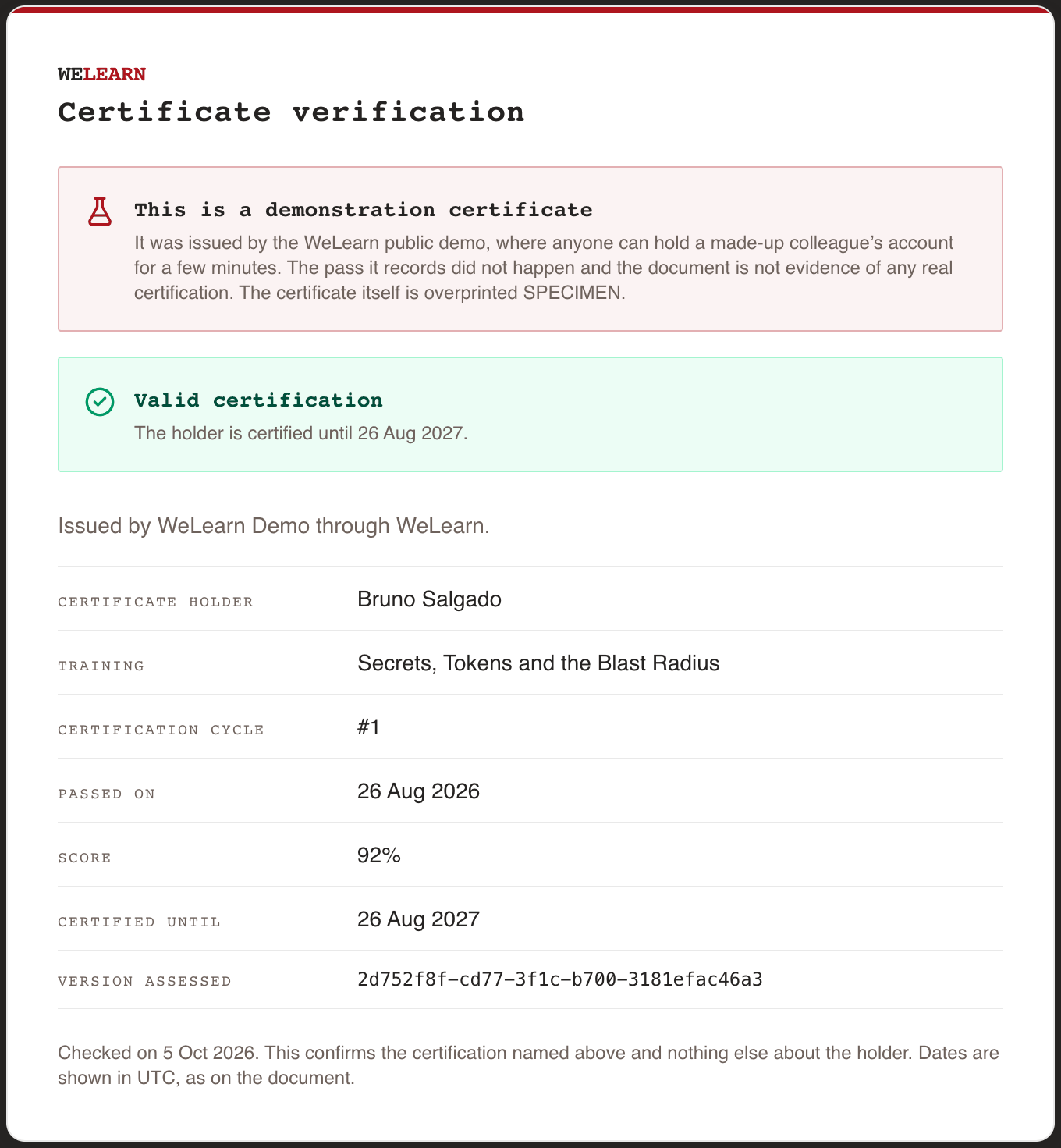
The page is titled Certificate verification.
Where the code is on the certificate
At the bottom of the certificate, under VERIFY THIS CERTIFICATE, is the verification code, followed by the full verification address. Opening that printed address checks the certificate straight away, with nothing to type.

Typing the code
If you only have the paper, open the page, type the code into the Verification code box and select Verify.
- Spaces do not matter. The code is printed in blocks of eight characters so it is easier to copy; type it with or without the spaces.
- Capital and small letters do matter. Keep each letter exactly as printed.
- The code is long and mixes capital and small letters, digits and a few signs. Watch for
characters that look alike, such as
0andO, orland1.
What the answer means
The page answers with one verdict at the top, then repeats what the certificate says so you can compare it line by line with the document.
| Verdict | What it means |
|---|---|
| Valid certification | The certificate is genuine and the holder is covered today. The line below gives the date it runs until, or says the training has no validity period |
| Expired certification | The certificate is genuine, but the certification lapsed on the date shown and has not been renewed. It is still a true record of the period it covered |
| Replaced by a later certification | The certificate is genuine, but the holder has passed the training again since. This document records the earlier period and is not evidence of current certification, even though the holder may be covered by the newer one |
| Pass on record | The certificate is genuine, but the page does not vouch for cover today, because the holder's current standing does not rest on this pass. That is the case while a revised submission of this round awaits a reviewer's verdict, once the organisation no longer treats the training as mandatory, and, on a training that never expires, when the holder started their first round over after passing it, which WeLearn no longer allows, and has not passed again since. Taking the training again does not produce it |
| "This certificate could not be verified" | No certification matches the code (section "When it does not verify") |
Below the verdict, the page names the organisation, "Issued by … through WeLearn.", and lists:
| Field | What it shows |
|---|---|
| Certificate holder | The holder's name |
| Training | The title of the training as it stood when it was passed |
| Certification cycle | Which round of certification this was, for example #2 |
| Passed on | The date of the pass |
| Score | The score, or Not scored if the training had no passing score |
| Certified until | The end date, or Does not expire |
| Version assessed | An identifier of the exact version of the training the holder sat |
What the page does not tell you
The page confirms this one certification and nothing else about the holder. It says so: "This confirms the certification named above and nothing else about the holder."
- No email address, no other trainings, no other certifications, no failed attempts.
- It does not prove who is standing in front of you. Certificate holder is the holder's name as it stands in WeLearn today, so it follows a later change of name. If the holder's account has since been removed, the page shows "Unknown learner" and every other fact unchanged.
- The code proves the certificate is WeLearn's, not that the paper is untouched. If a figure on the document differs from the page, trust the page.
Dates are in UTC
Every date on the page, and on the certificate, is given in UTC, the same for everyone wherever they are. The page says so: "Dates are shown in UTC, as on the document." Your own calendar may show a day earlier or later around midnight. The page also states when you checked: "Checked on …".
Specimen certificates from the demo
WeLearn has a public demo in which anyone can try the product for up to an hour. Certificates it issues verify too, so the page marks them before the verdict: This is a demonstration certificate. The pass it records did not happen and the document is not evidence of any real certification. The certificate itself is overprinted SPECIMEN.
When it does not verify
The page shows "This certificate could not be verified" and asks you to check the code against the document. It gives the same answer whatever the reason, on purpose:
- the code was mistyped, or a capital and a small letter were swapped;
- the certificate was not issued by this WeLearn site;
- the certification is no longer on record;
- the issuing organisation's space is suspended.
The page also limits how many checks can be made in a short time, and past that limit it gives the same "could not be verified" answer. If you are checking many certificates, pause, then try the code again before concluding it is invalid.
If a code still does not verify, ask the holder to download the certificate again from WeLearn and send you the new copy, or ask the organisation that issued it.
Related pages
- Mandatory trainings and certification, for the holder's side.
- Running compliance for your team, for the organisation issuing certificates.
- Trying WeLearn: the demo