
Everything WeLearn knows about your learning is yours to read and to take with you. It sits in Analytics, in the sidebar, on two tabs:
| Tab | It answers | Covers |
|---|---|---|
| My stats | How much have I done lately? | The period you pick, the last 12 months unless you change it |
| My learning | Where do I stand on what I must hold, and what have I done in all? | Your whole history |
Every member has both tabs. Managers and Administrators see more tabs beside them, about other people; those are described in Team analytics and employee reports.
Proving something: which export to use
| I need to prove | Use | Where |
|---|---|---|
| That I hold a mandatory certification today | Download certificate, and give the person the PDF. They check its code on the public verify page | My learning, on the training's row |
| Every certification I have ever held, earlier ones included | Download all certificates: one ZIP | My learning, top of the tab |
| My standing on every mandatory training, as a spreadsheet for an auditor | The first Export as CSV, beside Download all certificates | My learning, top of the tab |
| Everything I have passed, mandatory or not, for a new employer or a review | Download as PDF | My learning, under My learning record |
| The same, as a spreadsheet | The second Export as CSV, beside Download as PDF | My learning, under My learning record |
| Everything WeLearn holds about me, in a machine-readable file | Download my data | Settings › About, see Privacy and your data |
My stats has no export.
Nothing you export about yourself is recorded, and nobody is told. Only a Manager or Administrator opening or exporting your figures leaves a trace (see Privacy and your data).
My stats: your figures over a period
My stats is the tab Analytics opens on. Its heading reads Your learning year, with the period under Your year (for example "Oct 2025 – Oct 2026").
The period selector
The menu at the top right offers Last 12 months (the default), Last 6 months and Last 3 months. Every figure on My stats follows it, except where this page says otherwise. The period always ends today.
The menu stays on screen on My learning, but changes nothing there.
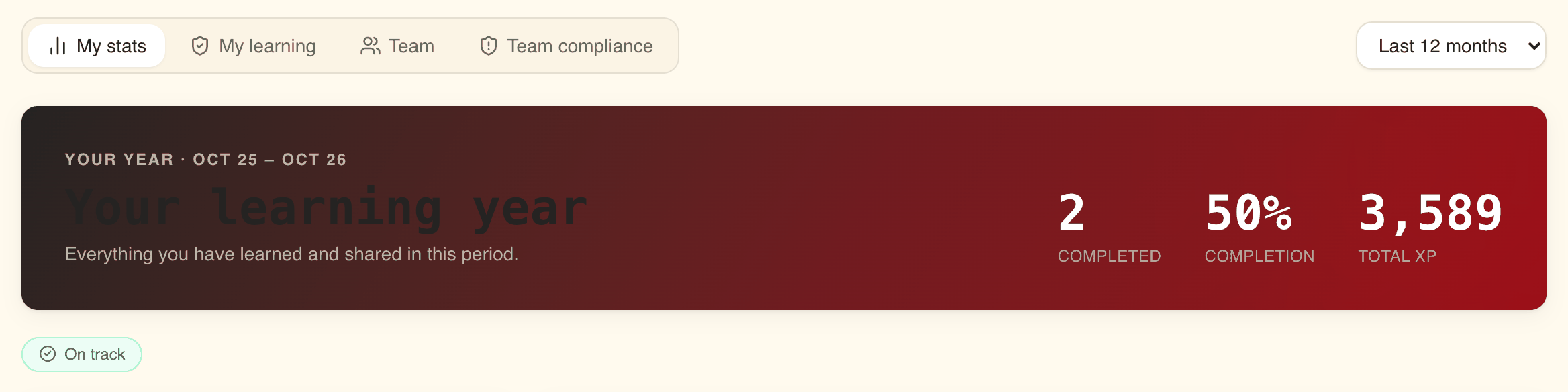
The band at the top and the flags
| Item | What it counts |
|---|---|
| Completed | Trainings you finished in the period, passed or not |
| Completion | Trainings finished in the period, divided by trainings you were enrolled on in the period. It can pass 100% when you finish, in the period, trainings you were enrolled on before it |
| Total XP | All the XP you have ever earned. If you have turned gamification off, Minutes takes its place (below) |
Under the band, one or more pills sum up where you stand today, whatever the period:
| Pill | Shown when |
|---|---|
| "N mandatory overdue" | You have that many mandatory trainings past their deadline and not passed |
| Inactive recently | You have earned no XP and finished no training in the last 30 days |
| Streak lost | Your streak is at zero and you have had one before |
| On track | None of the above |
The charts and tiles
| Card | What it shows |
|---|---|
| Enrollment mix | A ring with three slices: Completed (finished in the period), In progress (enrolled in the period, started, not finished) and Not started (enrolled in the period, not opened) |
| Quality | Two dials. Completion, the same figure as in the band. Pass rate, the share of the trainings you finished in the period that you passed |
| Highlights › Minutes | The estimated duration of the trainings you finished in the period, added up |
| Highlights › Mandatory | Mandatory trainings assigned to you in the period that you finished in the period, "of" how many were assigned, and how many of those are overdue |
| Highlights › Retakes | How many times you restarted the trainings you were enrolled on in the period |
| Highlights › Started | Trainings you were enrolled on in the period, whether you opened them or not |
| Trajectory | XP earned and trainings completed, week by week on Last 3 months, month by month on the longer periods |
| Interest fingerprint | The topics of the trainings you enrolled on in the period, up to eight, as a radar. The further a point reaches, the more trainings in that topic |
| Gamification | XP this period, Streak with your longest under it, Badges earned in the period, Total XP, and a bar per source of XP |
| Contributions | What you gave back in the period: Authored (trainings you created, with how many are published and in draft), Quests issued, Seasons, and Archived (trainings you created in the period and have since archived) |
If you have turned gamification off, the Gamification card reads Opted out: "This person has opted out of gamification, so XP, streaks and badges are not tracked. Their learning above is unaffected." The wording is the one a Manager sees about you; on your own tab it means you. Gamification is covered in Gamification.
My learning: your standing, then your record
My learning holds two sections, one under the other. Some screens call this tab "My compliance"; it is the same tab. A manager's chase opens it.
Your standing on mandatory trainings
The top of the tab lists your mandatory trainings, each with its status, Valid until or Due by, how many times you have been certified, Download certificate and Renew or Start. Every item is explained in Mandatory trainings and certification. If you have none, it reads "You have no mandatory trainings assigned."
Two exports sit above the list:
- Export as CSV saves
certification-record-followed by your name, as a spreadsheet: your name and email on every row, then one row per pass on each mandatory training (Cycle, Passed on, Score, Certified until, Version taken), and one row for each training you have not passed yet, with those columns empty. The Status column holds a code such asEXPIRING_SOONrather than the word on screen. - Download all certificates saves one ZIP holding a PDF certificate for every pass on these trainings, earlier passes and replaced ones included, ordered as the list is. It appears once you have at least one pass. You can build the ZIP 10 times an hour; past that, or if something goes wrong, it says "Could not build the archive. Try again in a moment."
A certificate is issued for each pass on a mandatory training, never for an ordinary training. Download certificate on a row gives the latest one; the ZIP gives them all.
My learning record: everything you have passed
Under the standing, My learning record lists "Everything you have learned here, whether it was assigned to you or not." It covers your whole time in the organisation, archived trainings included.
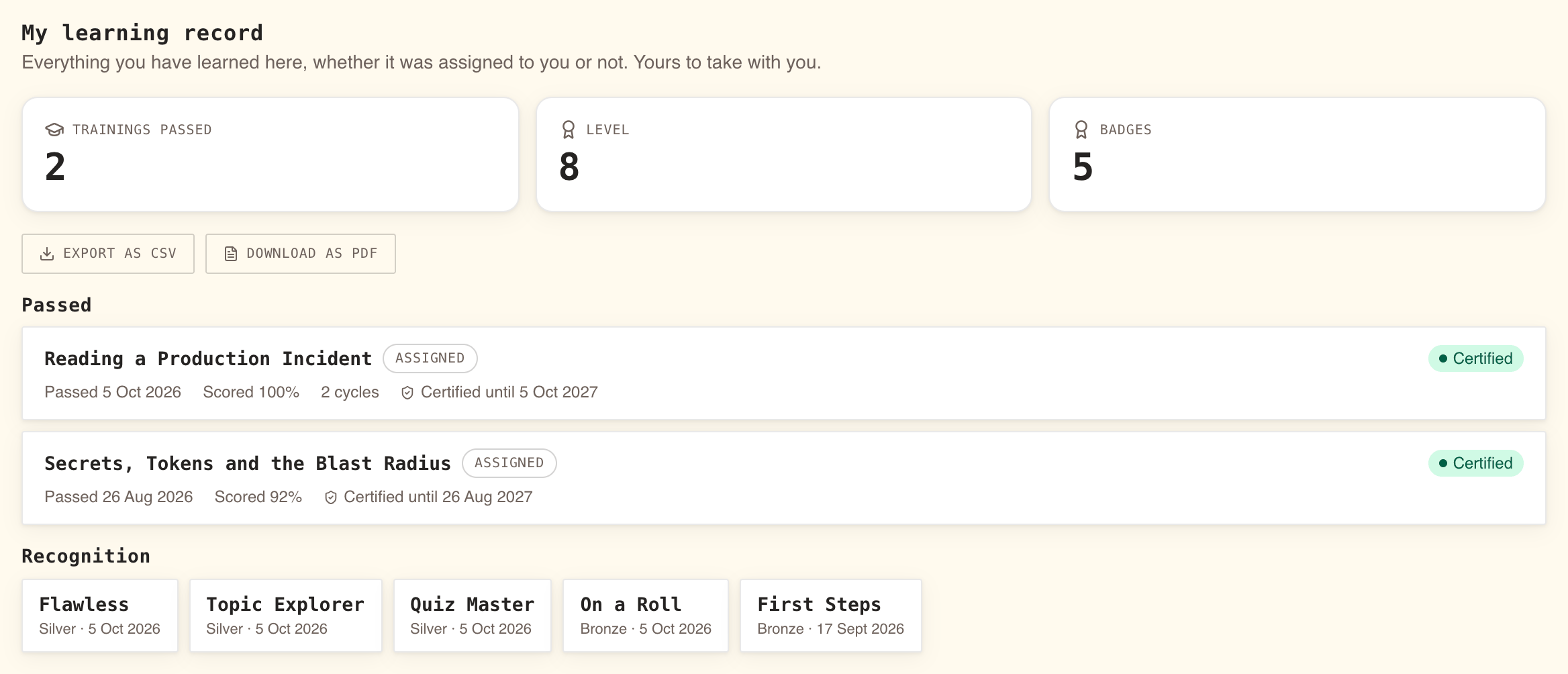
Three tiles open it: Trainings passed, your Level and your number of Badges. Then three sections:
| Section | What is in it |
|---|---|
| Passed | One row per training you have passed, newest first. "Nothing passed yet. Anything you finish will appear here." until you have one |
| Attempted, not passed | Trainings you finished without passing and have never passed. Shown only when you have one |
| Recognition | Every badge you have earned, quest trophies included, with its tier and date. "No badges earned yet." until you have one |
Each training row shows:
- the title, which opens the training's page, on its current version when a newer one has replaced the version you took;
- Assigned if your organisation required it of you, Voluntary if you chose it;
- on a mandatory training, its status pill, and Certified until with the date when it expires;
- Passed or Attempted with the date, and Scored with your score when it has one;
- "N attempts" when the pass took more than one go, and "N cycles" when you have passed it more than once, for example by renewing.
A training appears once, with your latest pass. Once you have passed a training, it stays under Passed even if a later round did not go well. A training you have not finished, or are waiting on a reviewer for, does not appear, unless you passed it in an earlier round.
Exporting your learning record
The two buttons under My learning record are offered even when the record is empty.
| Button | You get |
|---|---|
| Export as CSV | welearn-learning-record- followed by your name, .csv. One row per training passed: Training, Passed on, Score, Attempts, Cycles, Assigned, Certification, Certified until, Version passed |
| Download as PDF | welearn-learning-record- followed by the date, .pdf. A branded document headed LEARNING RECORD with your name, your role and the date issued |
The PDF opens with three figures, Trainings passed, Taken voluntarily (with how many were assigned) and Certifying. Then a Trainings passed table (Training, Passed, Score, Attempts, Assigned, Certification), where Certification reads "Not a certification" for an ordinary training, or the standing and its date for a mandatory one. It ends with Recognition: your Level, Total XP, Badges earned and a table of your badges. The PDF is always in English, whatever language you use WeLearn in.
If the PDF cannot be built, the button says "Could not build the document. Try again in a moment."
The CSV writes dates as full timestamps in UTC, and the Certification column as a code such
as VALID, or "Not a certification".
Good to know
- Your record outlives the training. A training archived after you passed it stays in your record and on your certificates, even though it leaves your dashboard. So does a training you can no longer see because your organisation narrowed who it is for: it leaves your standing, and stays in your record and in the ZIP that Download all certificates gives you.
- When you leave, your account goes and your record with it, apart from the anonymised history kept for the organisation's statistics. Export what you want to keep before your last day. Your certificates keep verifying after you leave; see Privacy and your data.
- Download my data is not your learning record. It is a raw, machine-readable copy of what WeLearn holds about you, for your rights under the GDPR. It does not contain your certificates.