
WeLearn records what you do while you learn, because that record is the point of a learning platform: your progress, your results, your certifications. This page says, in plain words, what is recorded, who sees it, how long it stays, and what you can do about it. The binding text is the privacy notice (section 10); this page follows it and adds the detail of how the screens behave.
Your organisation decides why and how your data is processed in its WeLearn space. Lunatech builds and runs WeLearn on your organisation's behalf and handles your data only to provide the service.
What WeLearn records about you
| Kind | What it holds |
|---|---|
| Account and profile | Your email address, name, optional picture, interface language and display settings, and the identity your organisation's sign-in passes to WeLearn. WeLearn stores no password |
| Learning activity | The trainings you are enrolled on, your progress, your answers, your scores, your results and your certifications |
| Gamification | Your XP, level, streak, badges, quest completions and the milestones shared to the activity feed, unless you switch it off (section 6) |
| Notifications | Your notification inbox and the channels you chose in Settings › Notifications |
| Your own words | Private notes, training ratings, reports of a problem in a training, and anything you write for a peer review |
| Tokens | The name, permissions and expiry of any access token you create. The token's secret is stored only in a one-way form that cannot be read back |
WeLearn sets only the cookies needed to sign you in. See the privacy notice (section 10).
Who can see what
| Your data | You | Managers | Administrators | Other members |
|---|---|---|---|---|
| Name, picture and role | Yes | Yes | Yes | Yes |
| Email address | Yes | Yes | Yes | No |
| How many people you follow and who follow you | Yes | Yes | Yes | Yes |
| The names on those follower and following lists | Yes | No | Yes | No |
| Your learning figures: trainings started, completed, passed and failed, retakes, mandatory trainings | Yes | Yes | Yes | No |
| Your certifications, with score and dates | Yes | Yes | Yes | No |
| Your XP, streaks and badges in your learning report | Yes | Yes, unless you switched gamification off | Yes, unless you switched gamification off | No |
| Badges on your profile | Yes | Yes, unless you switched gamification off or hid the badge | Same as Managers | Same as Managers |
| Your weekly XP on a leaderboard | Yes | Only those who share that leaderboard | Same as Managers | Same as Managers |
| Your badges and level milestones in the activity feed | Yes | Only those who follow you | Same as Managers | Same as Managers |
| Your private notes | Yes | No | No | No |
| Your notifications | Yes | No | No | No |
Managers and Administrators read your learning figures in Analytics › Team, and your certifications in Analytics › Team compliance and on your profile. The leaderboard and feed rows also depend on your own choices in Settings › Gamification (section 6).
What you write inside a training reaches particular people, whatever their role:
- A rating reaches the training's authors, Managers and Administrators as a total, never with your name on it.
- A problem you report reaches the same people with your name, so that an author can ask you about it.
- A peer-review submission is read, with your name, by the people allowed to grade it.
Your notes are strictly yours
Notes you write with Write a private note, and collect under My notes, can be read by you and nobody else: not the authors of the training, not your Manager, not an Administrator. They appear in no report, no analytics and no export, including your own Download my data file. When you leave the organisation they are deleted at once (section 9).
See Notes, ratings and reporting problems.
When someone opens your learning report, it is recorded
A Manager or Administrator can open any member's learning report in Analytics › Team and export it as a PDF. Each time they open your report or export it, WeLearn records who did it, when, and which period they looked at, plus the sections included in an export. You looking at your own figures is never recorded.
You are not notified of these views. The record exists so that access to your figures can be checked afterwards, and it is deleted after 24 months.
When someone downloads your certificate, you are told
Your own certificate downloads, from Analytics › My learning, are not recorded and tell nobody.
When a Manager or Administrator downloads one of your certificates, alone or inside a ZIP, WeLearn records it before the file reaches them, and you receive a notification: "… downloaded your certificate for …", with their name and the training. You receive at most one such notice per person per day, however many files they take; every download is still recorded.
This notification cannot be switched off. It belongs to Required notices in Settings › Notifications, marked Always on (in-app).
Gamification is on by default, and every switch is yours
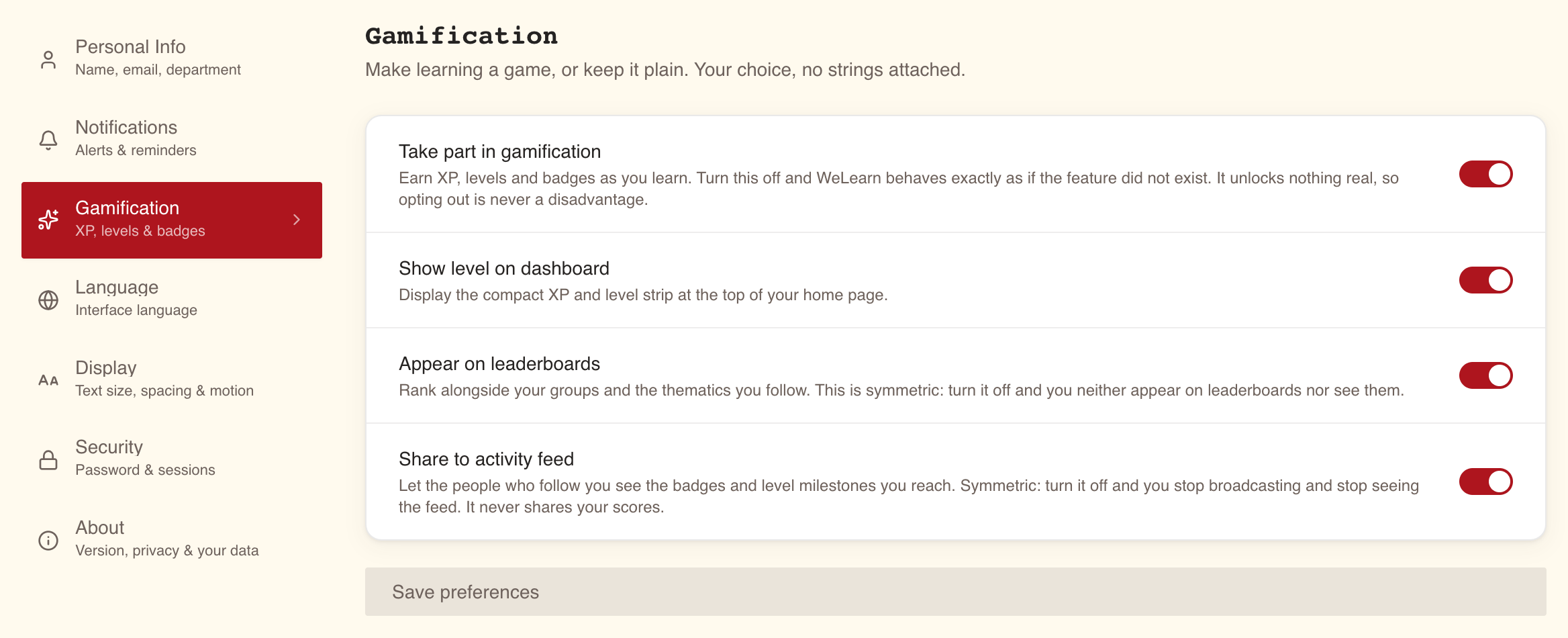
XP, levels, streaks, badges, leaderboards and the activity feed are on when you join. Everything is controlled by you, in Settings › Gamification, with no administrator involved. Your changes apply once you press Save preferences.
| Switch | What it does |
|---|---|
| Take part in gamification | The master switch. Off, WeLearn records no XP, streak, badge or quest progress for you, hides your badges from your profile, and replaces the gamification part of your learning report with a note that you opted out. Turning it off also turns the three switches below off |
| Show level on dashboard | Shows the XP and level strip at the top of your Dashboard. Changes nothing for anyone else |
| Appear on leaderboards | Off, you no longer appear on any leaderboard, and you no longer see them either. It also keeps your name off the daily puzzle scoreboard posted in Slack |
| Share to activity feed | Off, the people who follow you stop seeing your badges and level milestones, and you stop seeing the feed. It never shares your scores |
Opting out is never a disadvantage. Gamification unlocks nothing real: your trainings, results and certifications are unaffected. See Gamification.
Download my data gives you a copy
Settings › About › Download my data › Download saves a file called
welearn-export.json: a machine-readable copy of what WeLearn holds about you, which you can keep
or hand to another service.
| Part of the file | What it holds |
|---|---|
| Profile | Email, name, role, language, the sign-in identities linked to your account, the topics and people you follow, your saved trainings, your groups, and a link to your picture |
| Preferences | Your gamification, notification and display settings |
| Learning | Every enrollment, with your progress, answers and results |
| Gamification | Your total XP, every XP entry, your badges, quest completions, streak and activity-feed entries |
| Notifications | Your notification inbox |
| Tokens | The name, permissions, creation and expiry date of each access token. Never the secret |
| Channel links | The Slack account WeLearn found for you, if your organisation uses Slack |
You can request the file 5 times an hour. Past that, or if something goes wrong, the screen says "The export could not be generated. Please try again later." In the public demo there is no Download my data.
For your learning record as a PDF or spreadsheet, see Your learning record and exports.
How long things are kept
The privacy notice is what binds WeLearn; this table describes how WeLearn behaves today and may change.
While you are a member, most of your data lives as long as your account. A few kinds are cleared on a schedule:
| Data | Kept for |
|---|---|
| Notifications | 12 months, then deleted |
| Activity-feed entries | 24 months, then deleted |
| The record of Managers and Administrators opening or exporting your learning report | 24 months, then deleted |
| The record of your certificates downloaded by someone else | 24 months, then deleted |
| The record of role changes | 24 months, then the names are removed |
| An access token that has expired | 30 days after it expired, then deleted |
For the current schedule, the privacy notice refers you to your organisation's administrator.
In the public demo nothing is kept: the visit lasts one hour in all, or ends 15 minutes after you close the tab, and everything done during it is deleted.
When you leave the organisation
When you leave, an Administrator removes you from the organisation, and WeLearn works through your data in three steps. In a space that admits members by invitation, you cannot sign in again without a new invitation. In a space that admits everyone with an email address on the organisation's domain, signing in again creates a new, empty account.
| When | What happens |
|---|---|
| At once | Deleted: your account and profile, picture, preferences, notification inbox, sessions, access tokens and connected agents, follows in both directions, saved trainings, private notes, ratings, streak and draft-sharing access |
| 30 days later | Your XP history, badges and quest completions are kept for the organisation's totals, with your name taken off. Your activity-feed entries are deleted. Problems you reported and review notes you wrote stay for the authors, with your name taken off |
| 3 years later | Your enrollments, answers and results are kept for the organisation's statistics, with your name taken off |
You can ask for more than this. If you, or a former colleague, want your remaining history erased rather than kept without your name, ask your organisation's administrator for a GDPR erasure request, even after you have left. It is carried out promptly, without the 30-day wait, and also removes the text of the problems you reported and the review notes you wrote.
Your rights and where to read the full notice
Under the GDPR you can ask for a copy of your data, have wrong data corrected, have your account and data erased, and receive the data you provided in a machine-readable form. Download my data answers the copy and the machine-readable form; you can correct your name and picture yourself in Settings › Personal Info. For anything else, contact your organisation's administrator, who handles requests on your organisation's behalf.
The full privacy notice is in two places, with the same text:
- Inside WeLearn: Settings › About › Privacy notice › Read the notice.
- Without signing in:
/legal/privacyon the WeLearn site address, linked as Privacy from the WeLearn home page. Useful before your organisation has a space, or for a colleague who has no account.
The notice covers who processes your data, what is processed, which service providers receive it, how long it is kept, your rights and the cookies WeLearn sets.