
Everything a first-time author needs to build a certification on WeLearn: who does what, how to set it up so the pass means something, and what happens after it ships.
The learner's side of the same feature is in Mandatory trainings and certification, and the manager's day-to-day work in Running compliance for your team.
What a mandatory training is
A mandatory training is an ordinary training plus a compliance policy. You build the content exactly as you would any training; a Manager or an Administrator then declares it an obligation and sets how long a pass stays valid.
The policy belongs to the whole training (every version of it), not to one version or one learner. It has five settings, all on the Compliance card of the editor:
| Setting | What it means | Default |
|---|---|---|
| Mandatory training | The training is tracked as an obligation: badge, compliance reports, deadlines, certificates | Off |
| Certification expires, with its period | How long a pass certifies the learner, in days, months or years: a number and a unit that appear on the Certification expires row once it is on. They carry no visible label of their own (screen readers announce them as Valid for). Switched off, a pass never expires | Off. Switching it on proposes 12 months |
| Warn before expiry | How early before the end the learner's status turns to Expiring soon. Shown only when the certification expires | 30 days |
| Time to complete | The deadline given to a newly assigned learner when nobody picks a date: assigned day plus this | 30 days |
| Escalation recipients | Who gets the weekly digest of expired and overdue learners | The training's authors who are Managers or Administrators; if none, the organisation's Administrators |
A learner is certified when they complete every section and the plain average of their evaluation scores reaches the passing score. Each pass is recorded for good (date, score, version taken, valid until) and produces a downloadable PDF certificate with a code anyone can check on the public verify page.
Before you start: who does what
You can write the training with any account, but you cannot make it mandatory yourself. An author declaring their own training an obligation is refused by design, unless they are an Administrator. So a mandatory training always takes two people: the author and a compliance owner, a Manager who does not author any version of it, or an Administrator.
| Action | Who can do it |
|---|---|
| Create, edit and publish the training | Any member (Employee and up) who authors it. An invited Collaborator edits the draft but cannot publish |
| Invite collaborators or reviewers to a draft | An author or an Administrator; while the training is not mandatory, any Manager too |
| Turn Mandatory training on | A Manager who does not author it, or any Administrator |
| Change the Certification expires period, Warn before expiry, Time to complete or Escalation recipients on a training that is already mandatory, or use Require recertification | A Manager or Administrator who can open its editor: its authors who are Managers, and any Administrator |
| Turn Mandatory training off again | Administrator only |
| Enrol people, require the training of a group | Manager and up |
| See Team compliance, nudge, download other people's certificates | Manager and up |
The Compliance card appears only to Managers and Administrators. If you are an Employee author, you will not see it at all: your compliance owner does that part.
What changes once the training is mandatory
- The answer keys are locked down. On an ordinary training any Manager can open the editor. On a mandatory one only its authors and Administrators can, plus whoever is invited to one of its drafts or revisions, for that draft only. Every time an Administrator who does not author it opens the editor, that is recorded. A Manager who needs to edit it is invited by an author or an Administrator, as a Collaborator on a revision.
- Keep at least two authors. Inviting someone does not make them an author: a Collaborator is credited on the published training but gets no rights over it (see Co-authoring and reviewing drafts). Someone becomes an author when they open a revision with Edit and that revision is published. Any Manager can do that while the training is not mandatory; afterwards only an Administrator can. If every author leaves, nobody can edit the training except an Administrator, each time on the record, and the weekly digest goes to the organisation's Administrators unless you named recipients.
- You may still take it yourself. Nothing stops an author from holding an enrolment on their own mandatory training. If it is required of you, you hold it like everyone else.
The lifecycle at a glance
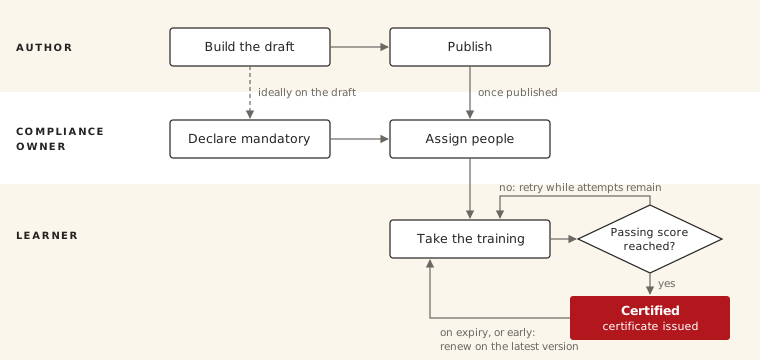
The author builds and publishes. A compliance owner who is not an author declares the obligation and assigns people. Each learner retries until they reach the passing score, within their attempts, then renews when the certification expires.
Step by step: building the training
The editor has four steps: Basic Info, Content, Preview, Publish. Everything autosaves, and a draft may stay incomplete until you publish. The editor itself is described in The training editor.
- Create the draft. Select Create Training in the sidebar, or New Training in My Trainings › Authored. Until it is published, the draft is visible to you, the people you invite, and any Manager or Administrator who has its link. It is never in the Catalog.
- Basic Info. Fill in the Title, the Description, at least one topic under Topics (the publish checklist calls it a "thematic") and the Language the training is written in. All four are required to publish.
- Content. Add the blocks in the order learners will meet them:
- Text blocks for the material itself.
- Link blocks for policies or documents that live elsewhere.
- At least one evaluation. Without one there is nothing to pass, and simply finishing the training certifies the learner. Quiz, Ordering, Matching, Categorization, Numeric and Cloze are graded automatically. Peer review is graded by a person, so certification waits for a reviewer. See Building evaluations.
- Make the quiz a question bank (recommended). In the quiz, switch on Question bank and set how many questions each attempt draws. Every retry and every renewal then draws a different subset, so nobody passes from last year's notes. Write at least twice as many questions as one attempt draws, or attempts start to repeat.
- Invite collaborators and reviewers. Use Invite on the draft. A Collaborator writes with you; a Reviewer reads the draft and leaves notes without editing. Neither becomes an author: see section 02 for how to get a second author.
- Preview. Play the training as a learner would. The preview shows the whole question bank, so you can check every question. Nothing you do there is recorded.
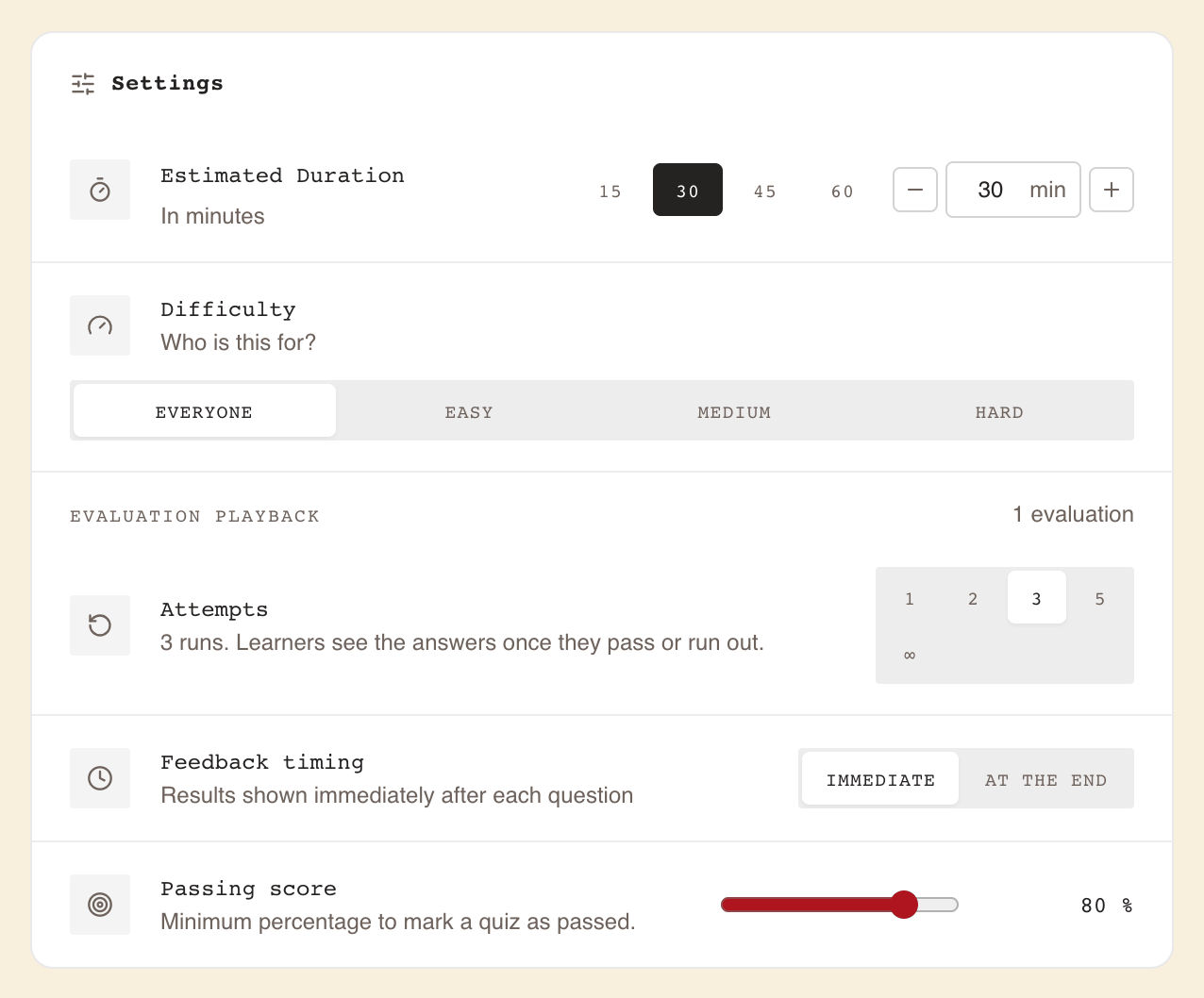
- Publish step: Settings. Set the Estimated Duration and Difficulty, then the Evaluation Playback settings, which apply to every evaluation in the training at once:
| Setting | For a mandatory training | Why |
|---|---|---|
| Passing score | A real threshold, for example 80 % | At No threshold every completion is a pass. The score compared with it is the plain average of all evaluations, each weighing the same, whatever its number of questions |
| Attempts | 3 or 5. ∞ only if you accept what it does to the answers | Once a learner has used every attempt without passing, they cannot pass on their own: a learner who has used every attempt has to ask the organisation's Administrators. Learners below the passing score do not see the correct answers until they pass or run out of attempts, so with ∞ a learner who keeps failing never sees them |
| Feedback timing | Your choice | Immediate shows a verdict after each answer; At the end shows the results once the learner finishes the training. In both, while a passing score applies and the learner is below it with attempts left, a wrong answer is not followed by the correct one |
- Fix the checklist, then publish. The Publish readiness panel lists every gap still blocking publication (a blank title, a question with no correct answer, a bank smaller than one draw) with its location. Publish Training turns on once the list is empty.
- Hand over to your compliance owner. Send them the settings you want (validity period, warning, time to complete, escalation recipients). If they are a Manager, send them the editor link of the draft before you publish: section 05 explains why. Section 05 is their part.
Making it mandatory (the compliance owner's part)
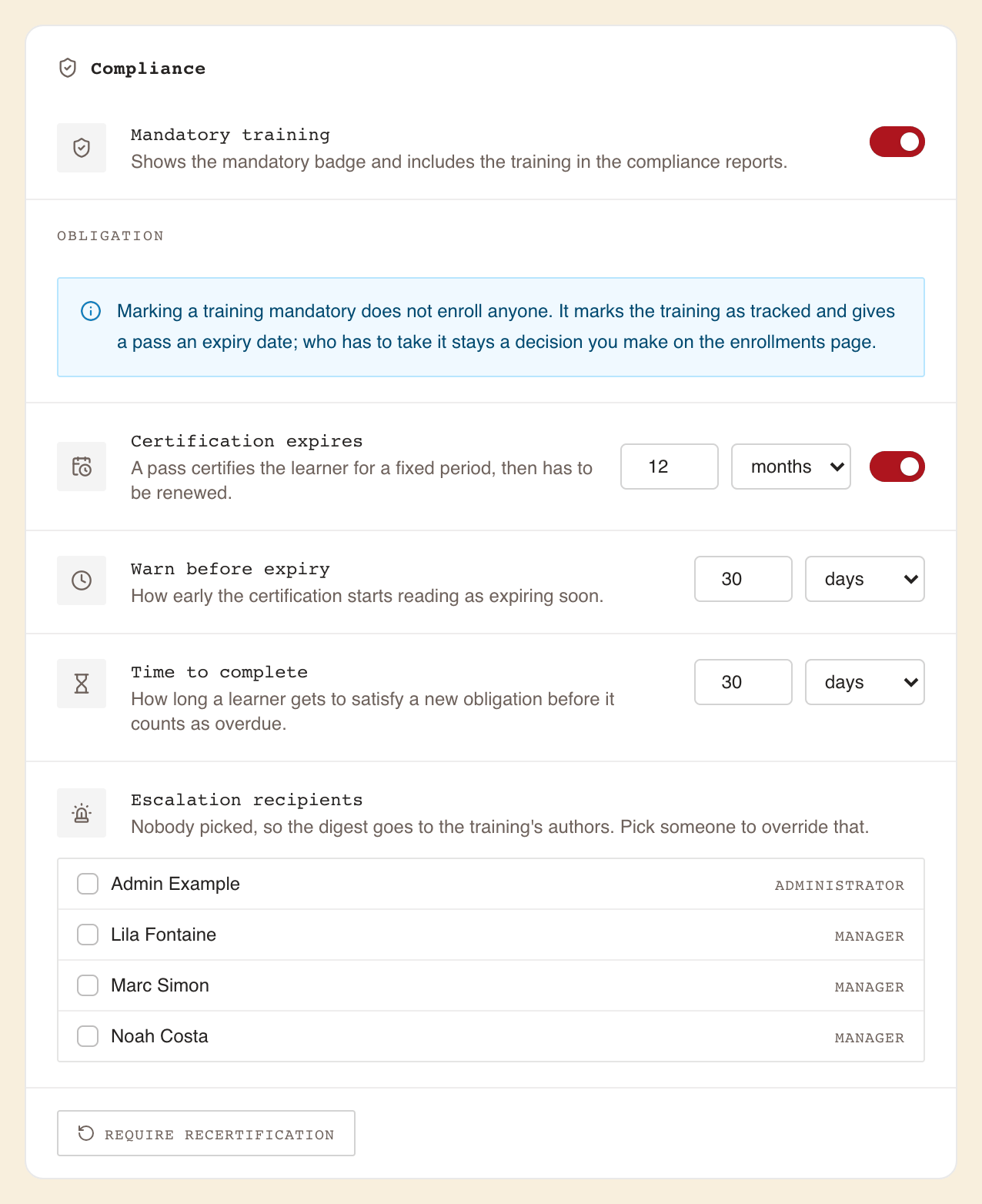
The compliance owner opens the training in the editor and goes to the Publish step, where a Compliance card appears below Settings. Only Managers and Administrators see it. It saves on its own about a second after each change, and applies at once to every version of the training: hovering Saved reads "Saved on 3 versions of this training". No revision or publish is needed.
- Switch on Mandatory training. The badge appears and the training enters the compliance reports. The card reminds you: "Marking a training mandatory does not enroll anyone."
- Switch on Certification expires if a pass should lapse, and set the period in the number and unit fields that appear beside its switch on the same row (the editor proposes 12 months; from 1 to 999 days, months or years). Leave it off for "everybody does this once".
- Set Warn before expiry (default 30 days): how early the learner's status turns to Expiring soon. It cannot be longer than the Certification expires period.
- Set Time to complete (default 30 days): the deadline a newly assigned learner gets when nobody picks a date.
- Optionally pick Escalation recipients among the people who can manage enrolments (Managers and Administrators). Nobody picked means the training's authors who are Managers or Administrators receive the digest, or the organisation's Administrators if no author is.
Assigning people
Marking the training mandatory enrols nobody. There are two ways to do it, and the training must be published first:
| Way | Where | Best for |
|---|---|---|
| One-off enrolment | Enrollments page: pick the training, the people or groups, an optional Due date, then Enroll | A fixed list of people, today. See Enrolling people |
| Group requirement | The group's page, Required trainings, Require a training, then Require | Everyone in a group, including people who join later. Current members are enrolled within the hour; newcomers the moment they join. See Groups and required trainings |
How each learner's deadline is set
- A Due date picked on the Enrollments page wins, counted to the end of that day in the learner's time zone.
- Otherwise the deadline is the day they were assigned plus Time to complete. A group requirement always works this way.
- For a renewal started while the learner is still certified, the deadline is the expiry date itself: renew before your cover runs out. After a lapse, it is the day they start again plus Time to complete.
- A deadline is fixed when it is set. Changing Time to complete later moves no existing deadline.
Who gets reminded, and when
| Who | When | Can they switch it off? |
|---|---|---|
| Learner | 7 days and 1 day before the deadline, at 08:00 their time | Yes, Deadline reminders |
| Learner | When the Warn before expiry window opens (30 days before expiry by default), again 7 days before expiry if the window is longer than 7 days, and the first morning after it lapses | No |
| Escalation recipients | Weekly, on Monday morning: counts of expired and overdue learners, never names | No |
| Learner | Whenever a Manager selects Nudge: one notification listing everything they owe. Not again within 3 days | No |
Nothing is sent on the day a learner becomes overdue: chasing them is what Nudge is for. The full schedule is in Running compliance for your team.
Publishing and what learners see
Publish the training from the Publish step once the checklist is clear; only a published training can be assigned. The policy can be set before or after publishing, within the limits of section 05.
What an assigned learner sees
- A red Mandatory badge on the training's card and page, and ★ Mandatory on their dashboard.
- An Action required band on their Dashboard as soon as the training is overdue or their certification has expired.
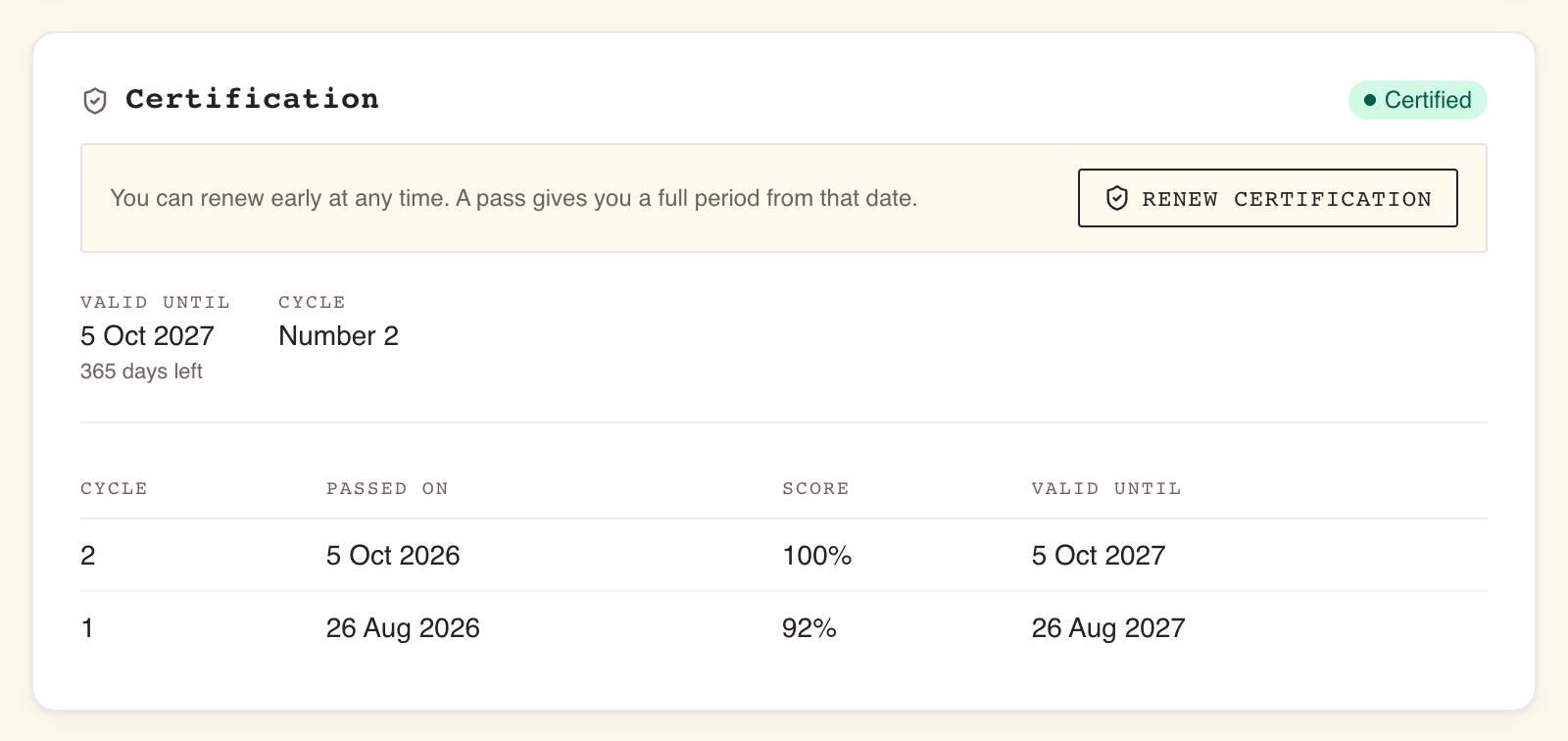
- A Certification panel on the training's page: status, Valid until, which Cycle they are on, their deadline, and the history of past passes.
- The My learning tab in Analytics, listing every obligation they hold, healthy ones included, with a one-click certificate download. Some screens call it "My compliance".
- After passing, a Renew certification button (or Take it again on a training that never expires). Renewing restarts every section on the latest published version.
The status a learner, and their manager, will see
| Status | Meaning |
|---|---|
| Never certified | Assigned, no pass yet, and the deadline has not gone by. A failed attempt stays here: they retry within their attempts |
| Certified | Passed, and the certification is not close to its end |
| Expiring soon | Still certified, but inside the Warn before expiry window |
| Expired | The expiry date has passed with no newer pass |
| Overdue | The deadline has passed and the current round is not passed. Someone who has already held a certification reads Expired instead |
A learner who starts a renewal early and abandons it halfway stays Certified until their original expiry. Renewing early is never punished: the new expiry is the pass date plus the validity period.
Certificates and tracking completion
Every pass on a mandatory training produces a PDF certificate: holder, training, version assessed, certification cycle, score, pass date and expiry (printed in UTC), plus a verification code.
Anyone holding the paper, an auditor or a client for example, can check it on the public
/verify page without an account. The page confirms what the certificate says and nothing more.
An expired or replaced certificate still verifies, and says so plainly. See
Verifying a WeLearn certificate.
| Who | Where | What they get |
|---|---|---|
| Learner | Analytics › My learning | Their standing on every obligation, their latest certificate per training, and every earlier one as a ZIP |
| Manager | Analytics › Team compliance, People to chase | A verdict line ("9 people need chasing."), then one row per person, worst first, filtered by Overdue now, Lapses this month and Lapses next quarter. Select people and Nudge in bulk |
| Manager | Team compliance, By training, then View on a training | Each learner's status on that training, a CSV export, and certificates as a ZIP (Latest pass per learner, or Every cycle) |
| Manager | A person's page, Certification record | That person's full record across all mandatory trainings, a CSV, one certificate per pass, and all of them as a ZIP |
| Escalation recipients | The weekly digest | Counts of expired and overdue learners, with a link to Team compliance |
Good to know as an author
- The digest names nobody, and reaches authors only if they are Managers. It carries counts only; the list of who is behind is on Team compliance, which needs the Manager role. An Employee author receives no digest.
- Downloading someone else's certificate is recorded, and the holder is told in the app who took it, at most once per downloader per day.
- Certificates exist only for tracked trainings. A pass on an ordinary training is a completion, not a certification, and has no certificate.
- People who took the training before it became mandatory need attention. Two cases:
- Someone enrolled before the training became mandatory does not hold it as an obligation: they read No under Assigned on By training, and nobody chases them. Require the training of a group they are in; within the hour their enrolment becomes an obligation with a deadline.
- Someone who passed while the certification did not expire has no end date on that pass. If Certification expires is switched on later, the pass is dated from when it was made: still Certified if that date is ahead, Expired at once if it is past, which puts them on the People to chase list. Before saving, the card asks Date the passes already on record? and says how many it dates and how many have lapsed.
Changing it after publication
A published training never changes in place: Edit opens a revision (a draft of the next version), and publishing that revision replaces the old version. Nobody loses their certification because of it. See Publishing, revisions and archiving.
| Change | How | Effect on learners |
|---|---|---|
| Fix or update content | Edit, then publish the revision | Certified learners stay certified, and those who had completed it are told it "has been updated with new content". Renewals use the latest version |
| Change attempts, passing score, question bank | Same: these belong to the content, so they need a revision | Applies to learners who start or renew on the new version |
| Change the Certification expires period or Time to complete | Compliance card, saved at once, no revision | Existing expiry dates and deadlines do not move. Only passes and assignments after the change use the new period |
| Change Warn before expiry or Escalation recipients | Compliance card | Applies at once |
| Switch Certification expires off | Compliance card | At once, everyone whose latest attempt is a pass reads Certified for good, including people who read Expired |
| Force everyone to retake now | Require recertification on the Compliance card | Ends every current certification at once; those people read Expired and are told. Cannot be undone; keep it for material changes such as a new law or policy. Not offered on a training that never expires, where there is nothing to end |
| Stop tracking it | Switch off Mandatory training (Administrator only) | No more standings, reminders or reports for anyone, and no new certificate downloads. Certificates already issued still verify |
| Retire it | Archive (its authors or an Administrator) | Certifications stay valid until their date, but nobody can renew, and the training leaves every compliance view. Export the CSVs and certificate ZIPs first. Prefer a revision when the topic continues |
First-timer checklist and common traps
Author
- Title, description, topic and language filled in.
- At least one evaluation, ideally a quiz with a question bank twice the size of one draw.
- Passing score set (not No threshold).
- Attempts set to 3 or 5, so a learner who fails is not stuck.
- A second author arranged, or Escalation recipients named (a Collaborator is not an author).
- Played through in Preview, every question checked.
- Publish checklist empty, training published.
- Compliance owner told which validity, warning, time to complete and escalation you want, and, if they are a Manager, sent the draft's editor link before publishing.
Compliance owner
- Policy declared by an Administrator, or by a Manager who does not author it, from a draft or revision link.
- The Certification expires period, Warn before expiry, Time to complete and Escalation recipients set.
- People assigned: the Enrollments page, or a group's Required trainings for joiners too.
- People who took the training before it became mandatory checked under By training.
- Team compliance checked after the next hourly run, and again a few days later, to confirm the population looks right.
Traps people fall into
| Trap | What happens | Avoid it |
|---|---|---|
| Passing score left at No threshold | Opening every section and finishing certifies the learner | Set a real percentage |
| One attempt only | A learner who fails cannot pass on their own and has to ask the organisation's Administrators | Allow 3 or 5 |
| Expecting Mandatory training to enrol people | Nobody is assigned; the reports stay empty, which is not the same as green | Enrol people, or require the training of a group |
| Requiring an ordinary training of a group, or ticking Mandatory training on the Enrollments page | Learners are enrolled, or get a badge, but nobody is tracked | Have the training itself marked mandatory on its Compliance card |
| A Manager selects Edit, then tries to declare it | Edit made them an author, and the declaration is refused | Let an Administrator declare it, or a non-author Manager from the draft's editor link |
| Inviting a Collaborator to get a second author | A Collaborator is credited, not an author | Have a Manager open a revision before the training is mandatory, or an Administrator after |
| A single author who later leaves | Nobody but an Administrator can edit it, each access recorded; the digest falls back to the Administrators | Keep two authors, or name escalation recipients |
| Shortening the Certification expires period and expecting existing dates to follow | Existing expiry dates keep their old value | Use Require recertification if everyone must redo it now |
| Looking for Require recertification on a training that never expires | The button is not there: a pass never lapses, so there is nothing to end, and everyone stays Certified | Switch Certification expires on: every earlier pass is dated from when it was made, and the button is offered from then on |
| Small question bank | Retries and renewals see the same questions again | Write at least twice the number of questions one attempt draws |
| Creating a new training to replace a mandatory one | Everyone starts back at zero and the old obligation dangles | Open a revision instead |